최근 명일 방주 : 엔드필드를 플레이하고 있다.
이제 조금은 연식이 되는 내 컴퓨터에서도 풀 성능으로 잘 돌아가는 최적화에 감탄한다.
게임 시작하면 나오는 프로롤그에서는 눈 밟는 쉐이더가 나오는데
이를 한번 만들어보려고 한다.

https://lucid-boundary.tistory.com/142
20. Tessellation Shader - 다니엘 릿 쉐이더 프로젝트
드디어 어려운 파트를 넘어갔다..이제는 좀 가벼운 마음으로 포스팅을 하겠다... Tessellation Shader란?이름부터 읽기 어려운 이 쉐이더는 초기 포스팅에도 나온 내용이다.https://lucid-boundary.tistory.com/1
lucid-boundary.tistory.com
필요한 쉐이더는 우선 Tessellation Shader이다.
Hull Shader / Domain Shader에 대해 복습하는걸 권장한다.
해당 포스팅에서 사용된 코드 원본이다.
이 코드를 기준으로 커스텀해보려고 한다.
Shader "LucidBoundary/Tessellation_WaterWaveEffect"
{
    Properties
    {
        _MainTex ("Texture", 2D) = "white" {}
        _BaseColor("Base Color", Color) = (1, 1, 1, 1)
        _WaveStrength("Wave Strength", Range(0, 2)) = 0.1
        _WaveSpeed("Wave Speed", Range(0, 10)) = 1


        [Enum(UnityEngine.Rendering.BlendMode)]
        _SrcBlend("Source Blend Factor", Int) = 0

        [Enum(UnityEngine.Rendering.BlendMode)]
        _DstBlend("Destination Blend Factor", Int) = 1

        _TessAmount("Tessellation Amount", Range(1, 64)) = 2
    }
    SubShader
    {
        Tags
        {
            "RenderType"="Transparent"
            "Queue"="Transparent"
            "RenderPipeline" = "UniversalPipeline"
        }

        Pass
        {
            Blend [_SrcBlend] [_DstBlend]
            Tags
            {
                "LightMode" = "UniversalForward"
            }

            HLSLPROGRAM
            #pragma vertex vert
            #pragma fragment frag
            #pragma hull tessHull
            #pragma domain tessDomain
            #pragma target 4.6

            #include "Packages/com.unity.render-pipelines.universal/ShaderLibrary/Core.hlsl"

            struct appdata
            {
                float4 positionOS : POSITION;
                float2 uv : TEXCOORD0;
            };

            struct tessControlPoint
            {
                float4 positionOS : INTERNALTESSPOS;
                float2 uv : TEXCOORD0;
            };

            struct tessFactors
            {
                float edge[3] : SV_TessFactor;
                float inside : SV_InsideTessFactor;

            };

            struct v2f
            {
                float2 uv : TEXCOORD0;
                float4 positionCS : SV_POSITION;
            };

            texture2D _MainTex;
            SamplerState sampler_MainTex;

            CBUFFER_START(UnityPerMaterial)
                float4 _MainTex_ST;
                float4 _BaseColor;
                float _TessAmount;
                float _WaveStrength;
                float _WaveSpeed;
            CBUFFER_END

            tessControlPoint vert(appdata v)
            {
                tessControlPoint o;
                o.positionOS = v.positionOS;
                o.uv = v.uv;
                return o;
            }

            v2f tessVert(appdata v)
            {
                v2f o;

                float4 positionWS = mul(unity_ObjectToWorld, v.positionOS);
                float height = sin(_Time.y * _WaveSpeed + positionWS.x + positionWS.z);
                positionWS.y += height* _WaveStrength;

                o.positionCS = mul(UNITY_MATRIX_VP, positionWS);
                o.uv = TRANSFORM_TEX(v.uv, _MainTex);
                return o;
            }

            tessFactors patchConstantFunc(InputPatch<tessControlPoint, 3> patch)
            {
                tessFactors f;
                f.edge[0] = f.edge[1] = f.edge[2] = _TessAmount;
                f.inside = _TessAmount;
                return f;
            }

            [domain("tri")]
            [outputcontrolpoints(3)]
            [outputtopology("triangle_cw")]
            [partitioning("fractional_even")]
            [patchconstantfunc("patchConstantFunc")]
            tessControlPoint tessHull(InputPatch<tessControlPoint, 3> patch, uint id : SV_OutputControlPointID)
            {
                return patch[id];
            }

            [domain("tri")]
            v2f tessDomain(tessFactors factors, OutputPatch<tessControlPoint, 3> patch, float3 bcCoords : SV_DomainLocation)
            {
                appdata i;

                i.positionOS = patch[0].positionOS * bcCoords.x + patch[1].positionOS * bcCoords.y + patch[2].positionOS * bcCoords.z;
                i.uv = patch[0].uv * bcCoords.x + patch[1].uv * bcCoords.y + patch[2].uv * bcCoords.z;

                return tessVert(i);

            }

            float4 frag (v2f i) : SV_Target
            {
                float4 textureSample = SAMPLE_TEXTURE2D(_MainTex, sampler_MainTex, i.uv);
                return textureSample * _BaseColor;
            }
            ENDHLSL
        }
    }
}
이 포스팅에서는 Render Texture를 이용하여 쉐이더를 구현하고자 한다.
Tessellation의 적용된 Shader의 Vertex Shader를 건들면, Hull 된 표면이 자연스럽게 따라오게 되어 있다.
플레이어 오브젝트가 쉐이더의 표면에 닿게 되면, 해당 위치 정보를 기억하여 Render Texture를 업데이트하고
쉐이더의 Fragment 단계에서 Render Texture 와 Main Texture를 샘플링하는 방식이다.


눈이 쌓인 평면만으로 이루어진 지형은 심심하기 그지없다.
명일 방주에서도 지형에 따라 눈이 쌓여있으면서, 정상적으로 눈 밟는 쉐이더가 동작하는걸 알 수 있다.

지형을 표현하기 위한 Noise Texture는 다음 이미지를 사용했다.

Noise Texture의 R 값에 따라 Saturate해서 0 ~ 256 값을 0 ~ 1 값으로 바꾼 다음,
World Position 을 그 값에 따라 높이를 주었을 때, 결과이다.
생각보다 재미있는 지형이 생성된다.
float snowNoise = SAMPLE_TEXTURE2D_LOD(
                                        _NoiseTex,
                                        sampler_NoiseTex,
                                        float4(positionWS.xz * _Scale, 0, 0),
                                        0).r;
v.positionOS += saturate(snowNoise);
다음은 플레이어 오브젝트가 닿은 부분에 효과를 주기 위해 Render Texture를 준비한다.
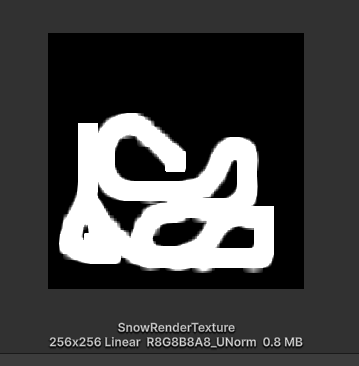
private void OnCollisionStay(Collision collision)
{
    if (collision.transform == Target)
    {
        ContactPoint ctPt = collision.contacts[0];

        Ray ray = new Ray(ctPt.point + Vector3.up, Vector3.down);
        RaycastHit hit;

        if (Physics.Raycast(ray, out hit, 3f, 3))
        {
            Debug.Log(hit.textureCoord);
            int xCoord = (int)(hit.textureCoord.x * textureWidth);
            int yCoord = (int)(hit.textureCoord.y * textureHeight);
            //int xCoord = Mathf.RoundToInt(hit.textureCoord.x * textureWidth);
            //int yCoord = Mathf.RoundToInt(hit.textureCoord.y * textureHeight);

            for (int xError = -10; xError < 10; xError++)
            {
                for (int yError = -10; yError < 10; yError++)
                {
                    if (xCoord + xError < 0 || xCoord + xError > textureWidth) continue;
                    if (yCoord + yError < 0 || yCoord + yError > textureHeight) continue;

                    pixelData[(yCoord + yError) * textureWidth + (xCoord + xError)] += Color.white - Color.white * (Mathf.Abs(xError) + Mathf.Abs(yError)) /20;

                }
            }

            Texture2D tempTexture = new Texture2D(textureWidth, textureHeight, TextureFormat.RGBA32, false);
            tempTexture.SetPixels(pixelData);
            tempTexture.Apply();


            RenderTexture.active = RecordRT;
            Graphics.Blit(tempTexture, RecordRT);
            RenderTexture.active = null;

            SnowPlainMat.SetTexture("_GlobalEffectRT", RecordRT);

            Destroy(tempTexture);
        }
    }
}
스크립트는 Collision 판정을 이용한다.
플레이어와 Snow Plain이 닿은 지점 ContactPoint를 구하여
Snow Plaine에 Y축으로 Raycast한다.
RaycastHit 의 TextureCoord가 곧 UV 위치이다.
Render Texture에 UV 위치를 Resolution을 고려해서 좌표를 구해준다.
pixelData[(yCoord + yError) * textureWidth + (xCoord + xError)] +=
				Color.white
                - Color.white * (Mathf.Abs(xError) + Mathf.Abs(yError)) /20;
닿은 지점으로부터 범위를 설정하여 흰색으로 바꿔주면 된다.
RenderTexture.active = RecordRT;
Graphics.Blit(tempTexture, RecordRT);
RenderTexture.active = null;

SnowPlainMat.SetTexture("_GlobalEffectRT", RecordRT);
이제 색상을 담은 배열은 RenderTexture 이전에 임시로 만든 Texture2D 에 적용한 뒤에
RenderTexture에 Blit 함수로 복사 한 뒤에 Shader로 보내준다.
Fragment 에서는 MainTex와 RenderTexture를 MainTex의 Sampler를 이용하여 매트릭스를 구한 뒤,
적절하게 블렌딩 해주면, 완성이다.
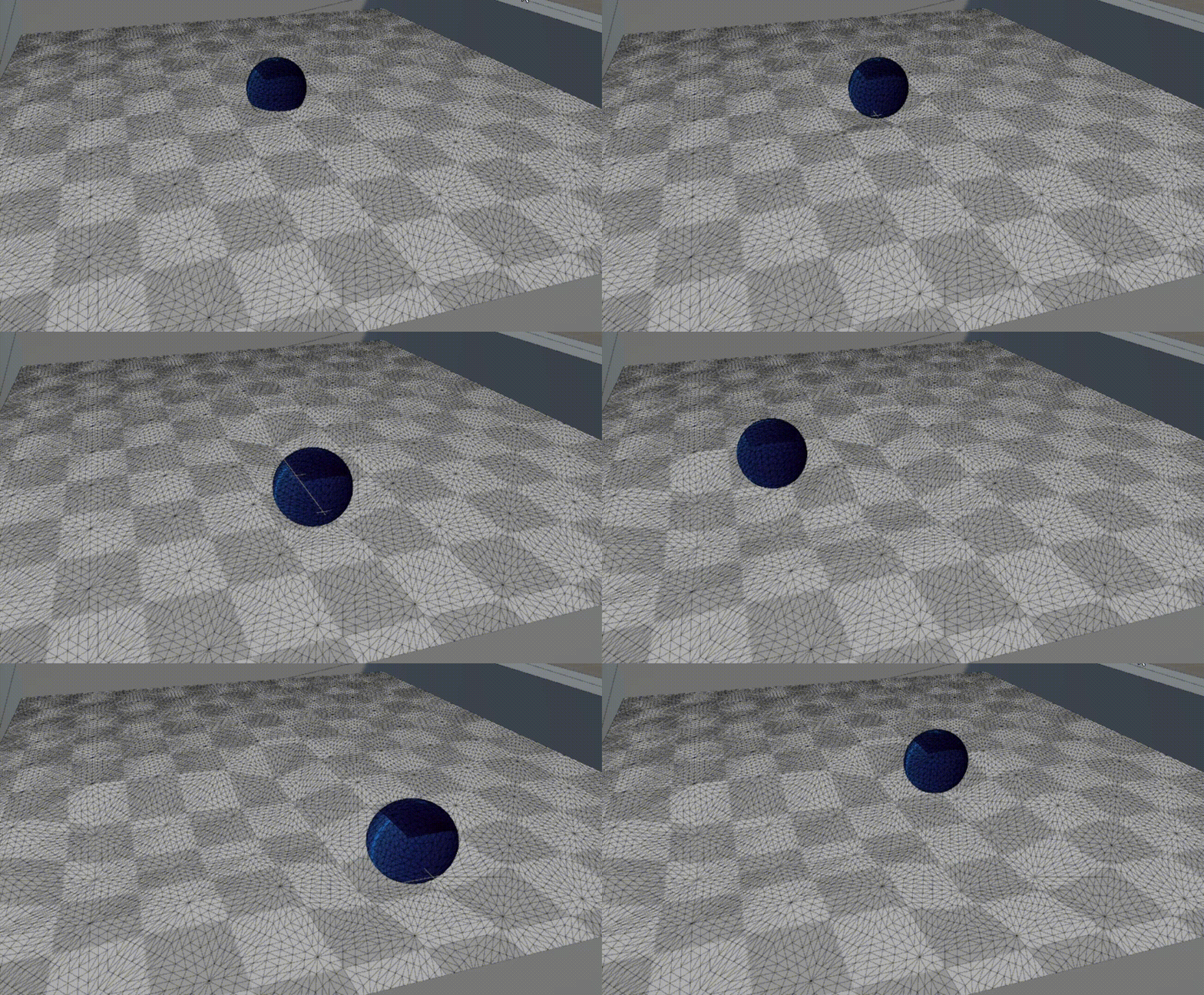

'Game Dev > Unity Shader' 카테고리의 다른 글
| Volumetric Fog Shader 리뷰하기 - Unity Shader (0) | 2026.01.11 |
|---|---|
| 3D Chinese Ink Painting Shader 리뷰하기 - Unity Shader (1) | 2026.01.09 |
| Unity URP Multi-Pass 사용 with Cel Shading (3) - Unity Shader (0) | 2026.01.05 |
| Cel Shading 실험 (2) - Research (0) | 2026.01.01 |
| 레트로 게임을 스케일링 해주는 xBR 알고리즘 - Unity Shader (1) | 2025.12.30 |