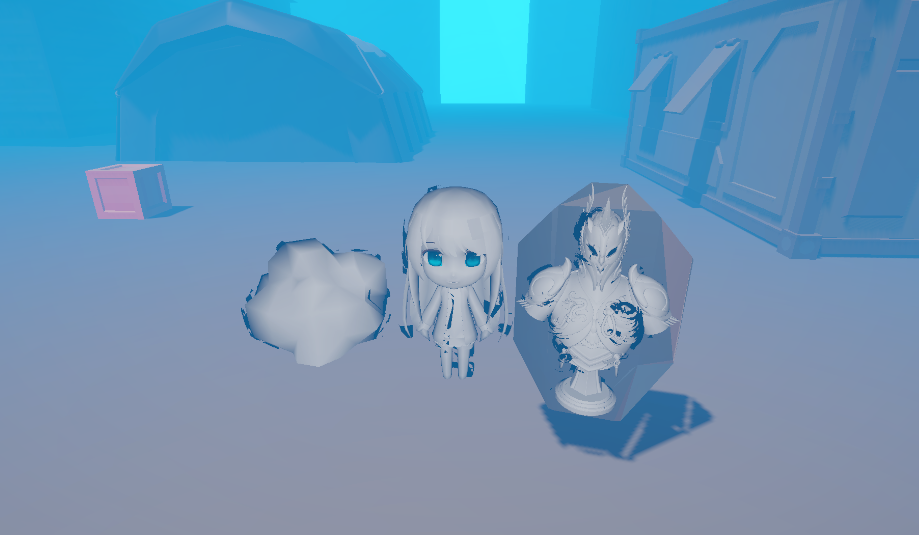
이번 쉐이더는 Post-Processing 에서 동작하는 Volumetric Fog 이다.
Shader 코드 전문
Shader "Lucide-Boundary/VolumetricFog"
{
    Properties
    {
        _Color("Color", Color) = (1, 1, 1, 1)
        _MaxDistance("Max distance", float) = 100
        _StepSize("Step size", Range(0.1, 20)) = 1
        _DensityMultiplier("Density multiplier", Range(0, 10)) = 1
        _NoiseOffset("Noise offset", float) = 0

        _FogNoise("Fog noise", 3D) = "white" {}
        _NoiseTiling("Noise tiling", float) = 1
        _DensityThreshold("Density threshold", Range(0, 1)) = 0.1

        [HDR]_LightContribution("Light contribution", Color) = (1, 1, 1, 1)
        _LightScattering("Light scattering", Range(0, 1)) = 0.2
    }

    SubShader
    {
        Tags { "RenderType" = "Opaque" "RenderPipeline" = "UniversalPipeline" }

        Pass
        {
            HLSLPROGRAM
            #pragma vertex Vert
            #pragma fragment frag
            #pragma multi_compile _ _MAIN_LIGHT_SHADOWS _MAIN_LIGHT_SHADOWS_CASCADE _MAIN_LIGHT_SHADOWS_SCREEN

            #include "Packages/com.unity.render-pipelines.universal/ShaderLibrary/Core.hlsl"
            #include "Packages/com.unity.render-pipelines.universal/ShaderLibrary/Lighting.hlsl"
            #include "Packages/com.unity.render-pipelines.core/Runtime/Utilities/Blit.hlsl"
            #include "Packages/com.unity.render-pipelines.universal/ShaderLibrary/DeclareDepthTexture.hlsl"

            float4 _Color;
            float _MaxDistance;
            float _DensityMultiplier;
            float _StepSize;
            float _NoiseOffset;
            TEXTURE3D(_FogNoise);
            float _DensityThreshold;
            float _NoiseTiling;
            float4 _LightContribution;
            float _LightScattering;

            float henyey_greenstein(float angle, float scattering)
            {
                return (1.0 - angle * angle) / (4.0 * PI * pow(1.0 + scattering * scattering - (2.0 * scattering) * angle, 1.5f));
            }

            float get_density(float3 worldPos)
            {
                float4 noise = _FogNoise.SampleLevel(sampler_TrilinearRepeat, worldPos * 0.01 * _NoiseTiling, 0);
                float density = dot(noise, noise);
                density = saturate(density - _DensityThreshold) * _DensityMultiplier;
                return density;
            }

            half4 frag(Varyings IN) : SV_Target
            {
                float4 col = SAMPLE_TEXTURE2D(_BlitTexture, sampler_LinearClamp, IN.texcoord);
                float depth = SampleSceneDepth(IN.texcoord);
                float3 worldPos = ComputeWorldSpacePosition(IN.texcoord, depth, UNITY_MATRIX_I_VP);

                float3 entryPoint = _WorldSpaceCameraPos;
                float3 viewDir = worldPos - _WorldSpaceCameraPos;
                float viewLength = length(viewDir);
                float3 rayDir = normalize(viewDir);

                float2 pixelCoords = IN.texcoord * _BlitTexture_TexelSize.zw;
                float distLimit = min(viewLength, _MaxDistance);
                float distTravelled = InterleavedGradientNoise(pixelCoords, (int)(_Time.y / max(HALF_EPS, unity_DeltaTime.x))) * _NoiseOffset;
                float transmittance = 1;
                float4 fogCol = _Color;

                while(distTravelled < distLimit)
                {
                    float3 rayPos = entryPoint + rayDir * distTravelled;
                    float density = get_density(rayPos);
                    if (density > 0)
                    {
                        Light mainLight = GetMainLight(TransformWorldToShadowCoord(rayPos));
                        fogCol.rgb += mainLight.color.rgb * _LightContribution.rgb * henyey_greenstein(dot(rayDir, mainLight.direction), _LightScattering) * density * mainLight.shadowAttenuation * _StepSize;
                        transmittance *= exp(-density * _StepSize);
                    }
                    distTravelled += _StepSize;
                }

                return lerp(col, fogCol, 1.0 - saturate(transmittance));
            }
            ENDHLSL
        }
    }
}
-Shader 구조
Shader 구조는 심플한 원 패스 형식이다.
Properties
SubShader
{
	Pass
    {
    	Tags
        HLSLPROGRAM
        ...
        ENDHLSL
    }
}
-Properties
Properties
{
    _Color("Color", Color) = (1, 1, 1, 1)
    _MaxDistance("Max distance", float) = 100
    _StepSize("Step size", Range(0.1, 20)) = 1
    _DensityMultiplier("Density multiplier", Range(0, 10)) = 1
    _NoiseOffset("Noise offset", float) = 0

    _FogNoise("Fog noise", 3D) = "white" {}
    _NoiseTiling("Noise tiling", float) = 1
    _DensityThreshold("Density threshold", Range(0, 1)) = 0.1

    [HDR]_LightContribution("Light contribution", Color) = (1, 1, 1, 1)
    _LightScattering("Light scattering", Range(0, 1)) = 0.2
}
전역으로 Fog를 깔아줄 것은 아니니 MaxDistance를 설정해줬다.
Fog Noise가 3D로 되어있는건 특징적인 부분이다.
Fog의 밀도를 적용할 DensityMultiplier, DensityThreshold 외에는 별다를 건 없어보인다.
Light 관련 부분은 Fragment Shader에서 자세히 알아보자.
-Keyword
#pragma vertex Vert
#pragma fragment frag
#pragma multi_compile _ _MAIN_LIGHT_SHADOWS _MAIN_LIGHT_SHADOWS_CASCADE _MAIN_LIGHT_SHADOWS_SCREEN

#include "Packages/com.unity.render-pipelines.universal/ShaderLibrary/Core.hlsl"
#include "Packages/com.unity.render-pipelines.universal/ShaderLibrary/Lighting.hlsl"
#include "Packages/com.unity.render-pipelines.core/Runtime/Utilities/Blit.hlsl"
#include "Packages/com.unity.render-pipelines.universal/ShaderLibrary/DeclareDepthTexture.hlsl"
#pragma multi_compile _ _MAIN_LIGHT_SHADOWS _MAIN_LIGHT_SHADOWS_CASCADE _MAIN_LIGHT_SHADOWS_SCREENhttps://docs.unity3d.com/6000.5/Documentation/Manual/urp/use-built-in-shader-methods-shadows.html
Custom Shadow를 사용하기 위한 프리 컴파일러이다.
메인 광원으로부터 Shadow Map을 가져올 수 있게 해준다.
#include "Packages/com.unity.render-pipelines.universal/ShaderLibrary/Core.hlsl"
#include "Packages/com.unity.render-pipelines.universal/ShaderLibrary/Lighting.hlsl"
Core / Light는 각각 헬퍼 함수들을 가져오고.
#include "Packages/com.unity.render-pipelines.core/Runtime/Utilities/Blit.hlsl"Blit은 Texture를 복사하는 연산을 도와주는 헬퍼 함수들을 포함하고 있다.
// The DeclareDepthTexture.hlsl file contains utilities for sampling the Camera
#include "Packages/com.unity.render-pipelines.universal/ShaderLibrary/DeclareDepthTexture.hlsl"
주석에 적혀있는 것처럼, 카메라를 샘플링하기 위한 헬퍼 함수들을 포함하고 있다.
Depth Texture가 URP에서 Enable 되어 있는지 체크하자.
- Shader 분석
이 쉐이더는 Vert 함수는 구현하고 있지 않다.
Fragment Shader만 보면 되는데, 중간에 함수들이 몇개 포함되어 있다.
| Vert | X |
| henyey_greenstein | angle, scattering float 값을 받아서, float 값을 리턴 |
| get_density | worldPos float3 값을 받아서, float 값을 리턴 |
| frag | Varyings IN 값을 받아서 Fragment Shader 처리 |
(1) frag
half4 frag(Varyings IN) : SV_Target
{
    float4 col = SAMPLE_TEXTURE2D(_BlitTexture, sampler_LinearClamp, IN.texcoord);
    float depth = SampleSceneDepth(IN.texcoord);
    float3 worldPos = ComputeWorldSpacePosition(IN.texcoord, depth, UNITY_MATRIX_I_VP);

    float3 entryPoint = _WorldSpaceCameraPos;
    float3 viewDir = worldPos - _WorldSpaceCameraPos;
    float viewLength = length(viewDir);
    float3 rayDir = normalize(viewDir);

    float2 pixelCoords = IN.texcoord * _BlitTexture_TexelSize.zw;
    float distLimit = min(viewLength, _MaxDistance);
    float distTravelled = InterleavedGradientNoise(pixelCoords, (int)(_Time.y / max(HALF_EPS, unity_DeltaTime.x))) * _NoiseOffset;
    float transmittance = 1;
    float4 fogCol = _Color;

    while(distTravelled < distLimit)
    {
        float3 rayPos = entryPoint + rayDir * distTravelled;
        float density = get_density(rayPos);
        if (density > 0)
        {
            Light mainLight = GetMainLight(TransformWorldToShadowCoord(rayPos));
            fogCol.rgb += mainLight.color.rgb * _LightContribution.rgb * henyey_greenstein(dot(rayDir, mainLight.direction), _LightScattering) * density * mainLight.shadowAttenuation * _StepSize;
            transmittance *= exp(-density * _StepSize);
        }
        distTravelled += _StepSize;
    }

    return lerp(col, fogCol, 1.0 - saturate(transmittance));
}
float4 col : blit 헬퍼 함수에서 가져온 _BlitTexture를 통해, 화면의 텍스처를 가져와서 샘플링했다.
float depth : SampleSceneDepth는 입력 받은 UV를 통해 depth 값을 구해준다.
float3 worldPos :depth 값은 world position 값을 구하기 위함이다.
float3 entryPoint : _WorldSpaceCameraPos는 Shader 내장 변수로 카메라 위치를 가져올 수 있다.
float3 viewDir : 오브젝트의 WorldPosition에 카메라 WorldPosition을 빼줘서 뷰 벡터를 계산한다.
float viewLength : length(viewDir)
float3 rayDir : viewDir의 normalize 벡터
float2 pixelCoords : _BlitTexture_TexelSize는 _BlitTexture의 해상도 관련 값을 가져올 수 있다. zw 차원은 각각 width, height를 의미하므로. 입력 UV * (width, height)를 해주고 있다. 이 의미는 0~1 사이의 UV와 실제 Width, Height를 고려하여
_BlitTexture에 대한 ScreenSpace의 픽셀 위치를 의미한다.
float distLimit : 오브젝트의 카메라 거리와 _MaxDistance (Properties 파라미터) 값을 비교하여 작은 값을 가져온다.
float distTravelled : 현재 픽셀의 위치와 Time / max(HALF_EPS, unity_DeltaTime.x) 를 이용하여 InterleavedGradientNoise를 만들어준다.
Interleaved Gradient Noise: A Different Kind of Low Discrepancy Sequence
The python code that goes along with this post can be found at In 2014, Jorge Jimenez from Activision presented a type of noise optimized for use with Temporal Anti Aliasing called Interleaved Grad…
blog.demofox.org
InterleavedGradientNoise (IGN) 은 저 불일치 수열을 가진 노이즈인데, 무작위성을 가진 것처럼 보이는 수열이다.
이는 같은 입력에 항상 같은 출력을 보여주면서, 결과는 무작위처럼 보이도록 한다.
Time / max(HALF_EPS, unity_DeltaTime.x)은 division zero 문제를 해결하면서, Frame에 상관없이 일정한 값을 가진다.
float transmittance : transmittance (투과율)은 우선, 100% 값으로 초기화한다.
while(distTravelled < distLimit)
{
    float3 rayPos = entryPoint + rayDir * distTravelled;
    float density = get_density(rayPos);
    if (density > 0)
    {
        Light mainLight = GetMainLight(TransformWorldToShadowCoord(rayPos));
        fogCol.rgb += mainLight.color.rgb * _LightContribution.rgb * henyey_greenstein(dot(rayDir, mainLight.direction), _LightScattering) * density * mainLight.shadowAttenuation * _StepSize;
        transmittance *= exp(-density * _StepSize);
    }
    distTravelled += _StepSize;
}
while(distTravelled < distLimit) 의 의미는 무엇일까?
일단은 오브젝트의 거리 혹은 최대 거리를 설정한 거리가 IGN으로 계산된 랜덤 distance 값보다 작을떄까지 반복한다는 뜻인데.
초기 distTravelled는 난수면서 매우 작은 값을 가지고 있으며, 이 값을 while을 통해 조금씩 올려가며 색상을 선택하는 용도이다.
드디어 Step 의 용도의 의미가 풀렸다. (Ray Marching)
float3 rayPos
카메라 위치 (Entry Point)에서 오브젝트로의 방향 (여기서 오브젝트가 아닌 화면상의 위치라고 할수도 있다. 대상은 BlitTexture니까..) * distTravelled를 해줬는데.
아!! 개발자의 의도가 오브젝트로의 방향으로 Step 만큼 샘플링 해가면서 투과율을 계산하려는 의도를 눈치챌 수 있을 것이다.
float density
float get_density(float3 worldPos)
{
    float4 noise = _FogNoise.SampleLevel(sampler_TrilinearRepeat, worldPos * 0.01 * _NoiseTiling, 0);
    float density = dot(noise, noise);
    density = saturate(density - _DensityThreshold) * _DensityMultiplier;
    return density;
}
직관적인 이름의 get_density 함수를 통해 density 값을 구해주고 있다.
rayPos를 입력 값으로 받고 있다.
카메라와 화면의 distTravelled 만큼의 위치에서 Density 값을 계산하는데..
https://learn.microsoft.com/ko-kr/windows/win32/direct3dhlsl/dx-graphics-hlsl-to-samplelevel
SampleLevel(DirectX HLSL 텍스처 개체) - Win32 apps
mipmap 수준 오프셋을 사용하여 텍스처를 샘플링합니다.
learn.microsoft.com
3D 텍스처의 SampleLevel을 이용하여 3D의 특정 깊이, 특정 오프셋, 특정 픽셀 위치를 고려하여 샘플링된 컬러값을 가져온다는 뜻이다. (이 코드에서는 sampler_TrilinearRepeat 방식으로 샘플링한다.)
샘플링된 컬러값은 결국 노이즈에서 가져온 것이므로, noise 자체가 되겠다.
자기 자신을 내적하여 스칼라화 된 제곱 값을 density로 지정했다.
이 density 값은 Threshhold와 MultiPlier를 통해 필터링 되면서, 강조시킬 값을 곱해준다.
Light mainLight : TransformWorldToShadowCoord 은 특정 위치에서 Shadow Space로 변환된 빛의 값을 가져오고 있다.
fogCol.rgb +=
mainLight.color.rgb *
_LightContribution.rgb *
henyey_greenstein(dot(rayDir, mainLight.direction), _LightScattering) *
density *
mainLight.shadowAttenuation *
_StepSize;
ShadowSpace의 색상, HDR 컬러, density, Shadow 감쇠, 현재 스텝에 henyey_greenstein 처리를 곱해주고 있다.
float henyey_greenstein(float angle, float scattering)
{
    return (1.0 - angle * angle) / (4.0 * PI * pow(1.0 + scattering * scattering - (2.0 * scattering) * angle, 1.5f));
}
이 함수는 산란 관련 함수로, Light 값을 산란 각도에 따라 광원 값을 변경해준다.
스텝 순서대로 계속 더해주며, 산란도를 구해주며 최종 산란도와 광원 값을 얻는다.
생각보다 빡세다..
'Game Dev > Unity Shader' 카테고리의 다른 글
| 명일방주의 눈 밟는 쉐이더 만들기 - Unity Shader (2) | 2026.01.26 |
|---|---|
| 3D Chinese Ink Painting Shader 리뷰하기 - Unity Shader (1) | 2026.01.09 |
| Unity URP Multi-Pass 사용 with Cel Shading (3) - Unity Shader (0) | 2026.01.05 |
| Cel Shading 실험 (2) - Research (0) | 2026.01.01 |
| 레트로 게임을 스케일링 해주는 xBR 알고리즘 - Unity Shader (1) | 2025.12.30 |